Những gì TabSpace làm được
What TabSpace can do
Mọi tính năng đều phục vụ một việc duy nhất: dùng nhiều tài khoản muse.ai cùng lúc trong một app, mỗi tài khoản một profile cách ly — và không một byte dữ liệu nào của bạn rời khỏi máy.
Every feature serves a single job: using many muse.ai accounts at once in one app, each in its own isolated profile — with not a byte of your data ever leaving your device.
Quản lý nhiều tài khoản
Managing many accounts
Nhiều tài khoản muse.ai, session cách ly
Many muse.ai accounts, isolated sessions
Mỗi tài khoản muse.ai có một profile riêng với cookie, localStorage, cache tách biệt hoàn toàn. Đăng nhập một lần, lần sau tự nhớ — mở app là thấy mọi tài khoản của bạn.
Each muse.ai account gets its own profile with fully isolated cookies, localStorage, and cache. Sign in once, and it's remembered — open the app and all your accounts are there.
Trang chủ — mọi tài khoản trong một cái nhìn
Home — every account at a glance
Mở app là vào Trang chủ: thẻ từng tài khoản muse.ai với vòng hạn mức thật, badge tin mới và nút mở nhanh — kèm dải tổng quan hạn mức và lối tắt tới Tệp đã tải, Chế độ demo.
Open the app and you land on Home: a card per muse.ai account with its real usage ring, new-message badge and quick-open button — plus a usage-overview strip and shortcuts to Downloads and Demo mode.
Chuyển tài khoản muse.ai bằng phím tắt
Switch muse.ai accounts by keyboard
Đang chat dở ở tài khoản này, bấm Cmd/Ctrl+1..9 là sang tài khoản muse.ai khác ngay; Ctrl+Tab (macOS) hoặc Ctrl+PgDn/PgUp (Windows) chuyển tới/lui giữa các profile, Cmd+K (macOS) mở Quick Switcher tìm tài khoản tức thì — không cần chuột, không cần đăng xuất.
Mid-chat in one account? Cmd/Ctrl+1..9 jumps straight to another muse.ai account; Ctrl+Tab (macOS) or Ctrl+PgDn/PgUp (Windows) cycles between profiles, Cmd+K (macOS) opens the Quick Switcher to find an account instantly — no mouse, no signing out.
Báo ngay khi muse.ai trả lời xong
Notified the moment muse.ai finishes
TabSpace theo dõi tab muse.ai: AI trả lời xong là badge đỏ hiện ngay trên tab, khỏi ngồi canh; số thông báo mới từ tiêu đề trang (5) ... cũng hiện cùng lúc.
TabSpace watches your muse.ai tabs: the moment the AI finishes, a red badge appears on the tab — no need to sit and wait; unread counts from the page title (5) ... show up too.
Dùng song song trên mọi màn hình
Side by side on every screen
Dock nổi thu gọn (iOS & Android)
Collapsed floating dock (iOS & Android)
Thanh header được thay bằng dock nổi thu gọn: một nút avatar, bấm để bung ra đủ nút điều hướng — kéo thả khắp màn hình, tự bám mép, chỉ một dock cho cả app.
The header bar is replaced by a collapsed floating dock: one avatar button that expands into all navigation controls — drag it anywhere, it snaps to an edge, and there is only one dock for the whole app.
Đa ô nổi (macOS & Windows)
Floating panes (macOS & Windows)
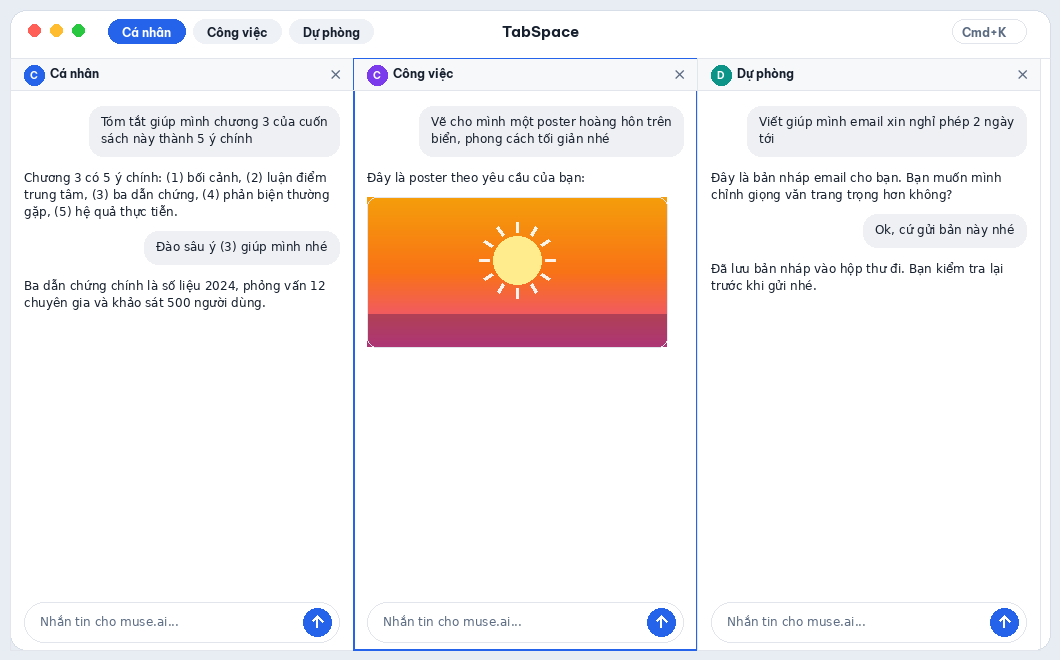
Mở 1–6 tài khoản muse.ai cùng lúc trong một app duy nhất: 2 ô chia đôi, từ 3 ô trở lên mỗi tài khoản là một ô nổi trong cùng một cửa sổ — kéo thả đổi chỗ, nhớ vị trí, đóng từng ô bằng dấu ×, tự xuống dòng khi hẹp.
Run 1–6 muse.ai accounts at once in a single app: two panes split the window, three or more become floating panes in a single window — drag to rearrange, positions remembered, close any pane with its ×, and panes reflow when narrow.
Quản lý từng tài khoản muse.ai
Manage each muse.ai account
Ghim tài khoản muse.ai hay dùng lên đầu (Windows), tắt tiếng từng tài khoản riêng biệt — chấm trạng thái cho biết tài khoản nào đang tải, đã sẵn sàng hay lỗi, để bạn luôn biết mỗi tài khoản muse.ai đang ở trạng thái nào.
Pin frequent muse.ai accounts to the top (Windows), mute each account individually — a status dot shows which account is loading, ready, or in error, so you always know where every muse.ai account stands.
Mỗi profile một dấu riêng
A distinct mark for every profile
Gắn emoji, màu riêng và ảnh đại diện cho từng profile muse.ai — nhìn Trang chủ, bộ chọn profile hay dock nổi là biết ngay đang ở tài khoản nào, không sợ nhầm tài khoản khi chuyển nhanh.
Give each muse.ai profile its own emoji, accent color and avatar photo — a glance at Home, the profile switcher or the floating dock tells you exactly which account you're in, so fast switching never lands you in the wrong account.
Chạy nền & riêng tư
Background & privacy
Tài khoản muse.ai vẫn chạy khi thu gọn (Windows)
muse.ai accounts keep running in the tray (Windows)
Bấm X ẩn app vào khay hệ thống — các tài khoản muse.ai vẫn chạy nền, AI trả lời xong vẫn báo, file tải về vẫn chạy. Click icon tray để mở lại ngay đúng chỗ cũ.
Clicking X hides the app to the system tray — your muse.ai accounts keep running in the background, finished replies still notify you, and downloads keep going. Click the tray icon to jump straight back where you left off.
Export / Import danh sách profile
Export / Import profile list
Xuất toàn bộ danh sách profile muse.ai thành một file JSON trên máy bạn — để backup hoặc chuyển sang máy khác, nhập lại trong vài giây. Không cần tài khoản, không qua máy chủ nào.
Export your whole muse.ai profile list to a JSON file on your machine — for backup or moving to another computer, import it back in seconds. No account, no server involved.
Không thu thập, không lưu trữ dữ liệu
No data collected, no data stored
TabSpace KHÔNG thu thập và KHÔNG lưu trữ dữ liệu của bạn ở bất cứ đâu: toàn bộ profile, cookie, session của các tài khoản muse.ai chỉ nằm cục bộ trên máy bạn. Không máy chủ, không tracking, không quảng cáo, không cần tài khoản TabSpace — bạn chỉ đăng nhập bằng chính tài khoản muse.ai của mình.
TabSpace collects NO data and stores NO data of yours anywhere: all profiles, cookies, and sessions of your muse.ai accounts live only on your machine. No servers, no tracking, no ads, no TabSpace account required — you just sign in with your own muse.ai accounts.
Tính năng nổi bật trên từng nền tảng
Highlights on every platform
Cùng một triết lý — mỗi tài khoản muse.ai một không gian cách ly — được làm riêng cho từng hệ điều hành, và dùng chung một định dạng danh sách profile để chuyển qua lại giữa các máy. Trên nền tảng nào, dữ liệu profile cũng chỉ nằm trên máy bạn.
One philosophy — every muse.ai account in its own isolated space — built natively for each operating system, sharing one profile-list format across all your devices. On every platform, profile data stays on your machine.
macOS & Windows
Đã có bản tải về Available now- Mở 1–6 tài khoản muse.ai cùng lúc trong các tab cách ly tuyệt đối: 2 ô chia đôi, từ 3 ô trở lên là các ô nổi kéo thả trong cùng một cửa sổ; mở app là vào Trang chủ với thẻ profile sống và tổng quan hạn mức. Badge đỏ báo ngay khi muse.ai trả lời xong ở tab nền.
- Run 1–6 muse.ai accounts at once in fully isolated tabs: two panes split the window, three or more become draggable floating panes in a single window; opening the app lands on Home with live profile cards and a usage overview. A red badge appears the moment muse.ai finishes in a background tab.
- Làm việc nhanh: Cmd/Ctrl+1..9 mở tab, Ctrl+Tab (macOS) / Ctrl+PgDn (Windows) chuyển tab, Quick Switcher Cmd+K (macOS), ghim tab (Windows), tắt tiếng từng tab, thu gọn vào khay hệ thống (Windows).
- Fast workflow: Cmd/Ctrl+1..9 to open tabs, Ctrl+Tab (macOS) / Ctrl+PgDn (Windows) to switch tabs, Cmd+K Quick Switcher (macOS), tab pinning (Windows), per-tab mute, minimize to system tray (Windows).
- Trong app có đủ: Trang chủ, quản lý file tải về, tự kiểm tra bản cập nhật (macOS), khóa app bằng PIN / Touch ID, giao diện tiếng Việt / English, xuất / nhập danh sách profile.
- Built in: Home page, downloads manager, automatic update checks (macOS), PIN / Touch ID app lock, Vietnamese / English interface, profile export / import.
Android
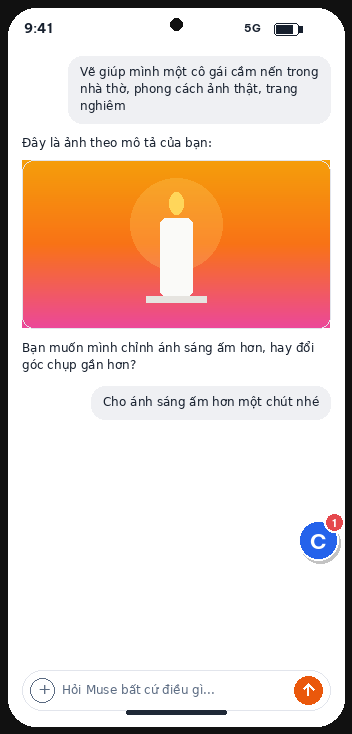
Đã có trên Google Play Available on Google Play- Chuyển tài khoản muse.ai trong 2 chạm: mỗi profile là một vùng chứa WebView riêng của Android — cookie không bao giờ lẫn nhau.
- Switch muse.ai accounts in two taps: each profile is its own Android WebView container — cookies never mix.
- Dock nổi thu gọn: một nút avatar thay thanh trên — bấm bung ra đủ nút lùi, tiến, tải lại và chuyển 1/2 ô; kéo thả khắp màn hình, tự bám mép.
- Collapsed floating dock: one avatar button replaces the top bar — tap to expand back, forward, reload and 1/2-pane controls; drag it anywhere, it snaps to an edge.
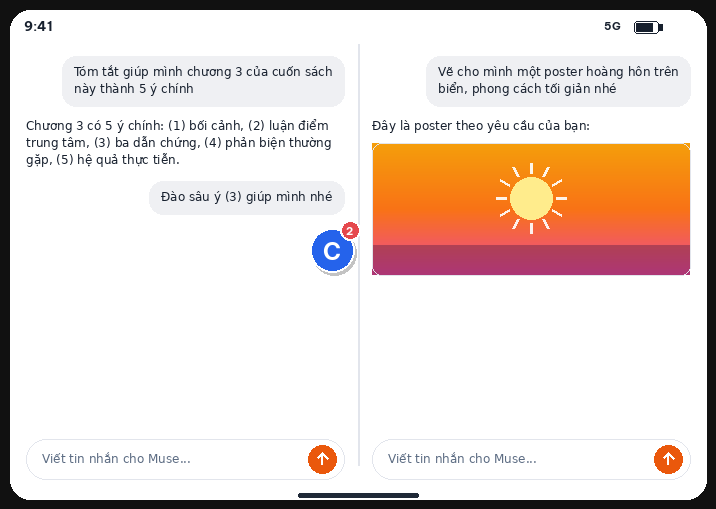
- Tablet & máy gập: màn hình rộng từ 700dp trở lên mở được 2 profile song song, mỗi ô một tài khoản muse.ai đang hoạt động.
- Tablets & foldables: windows 700dp and wider run two live muse.ai accounts side by side.
- Khóa vân tay / khuôn mặt và thông báo khi muse.ai trả lời xong — khỏi phải ngồi canh điện thoại. Giao diện tiếng Việt / English.
- Fingerprint / face lock and a notification when muse.ai finishes — no need to watch the phone. Interface in Vietnamese / English.
- Tiện ích native: màn Tệp đã tải trong app, nhấn giữ icon để mở nhanh profile, đăng xuất từng profile, xuất / nhập JSON dùng chung với bản máy tính. Cần Android 10 trở lên.
- Native extras: in-app downloads list, long-press the icon to open a profile, per-profile sign-out, JSON export / import shared with desktop. Requires Android 10+.
iOS
Đã có trên App Store Available on the App Store- Trên iPhone: một tài khoản muse.ai hoạt động, chuyển 2 chạm, khóa app bằng Face ID / Touch ID (iPhone Duo dùng Touch ID ở nút nguồn).
- On iPhone: one active muse.ai account, two-tap switching, Face ID / Touch ID app lock (Touch ID in the power button on iPhone Duo).
- Dock nổi thu gọn: thay hẳn thanh header — một nút avatar, bấm bung ra pill đủ nút (Trang chủ, Tải về, Cài đặt, chuyển 1/2 ô); kéo thả khắp ô, tự bám mép như AssistiveTouch, chỉ một dock cho cả app.
- Collapsed floating dock: replaces the header bar entirely — one avatar button that expands into a pill of controls (Home, Downloads, Settings, 1/2-pane switch); drag it anywhere, it snaps to an edge like AssistiveTouch, and there is only one dock for the whole app.
- iPhone Duo & iPad: mở rộng màn hình là 2 tài khoản muse.ai chạy song song thật; gập lại giữ đúng profile đang dùng, mở ra khôi phục đúng chỗ cũ.
- iPhone Duo & iPad: unfold for two truly live muse.ai accounts side by side; fold back and the profile you were using stays — unfold again to pick up right where you left off.
- Thông báo + số tin mới trên icon khi muse.ai trả lời xong lúc bạn đang ở app khác.
- Notifications + icon badge count when muse.ai finishes while you are in another app.
- Tiện ích native: tệp đã tải xem / chia sẻ ngay trong app và hiện trong Files, Quick Actions mở nhanh profile từ icon, đăng xuất từng profile. Cần iOS 17 trở lên.
- Native extras: downloads you can view / share in-app and in Files, home-screen Quick Actions, per-profile sign-out. Requires iOS 17+.
Tải TabSpace
Download TabSpace
Một app duy nhất cho mọi tài khoản muse.ai của bạn — miễn phí, không quảng cáo, không thu thập dữ liệu, không cần tài khoản TabSpace. Bấm vào biểu tượng của từng nền tảng để tới đúng nơi tải.
One single app for all your muse.ai accounts — free, no ads, no data collection, no TabSpace account needed. Tap a platform's icon to go straight to its download.



Ủng hộ TabSpace
Support TabSpace
TabSpace là ứng dụng miễn phí, không quảng cáo, không theo dõi. Nếu thấy ứng dụng hữu ích, bạn có thể mời tác giả một ly cà phê — hoàn toàn tự nguyện, bạn không nhận thêm bất kỳ tính năng nào khi ủng hộ.
TabSpace is free, ad-free, and tracking-free. If you find it useful, you can buy the developer a coffee — purely voluntary, you do not receive any additional features in return.
Buy me a coffee
Buy me a coffee

Mở ứng dụng ngân hàng bất kỳ có hỗ trợ VietQR
và quét mã trên để chuyển khoản.
Open any VietQR-enabled banking app
and scan the code above to contribute.
Cảm ơn bạn đã đồng hành cùng TabSpace. Mọi đóng góp, dù nhỏ, đều là nguồn động viên để ứng dụng tiếp tục được phát triển và duy trì.
Thank you for supporting TabSpace. Every contribution, however small, helps keep the app maintained and improved.
Chính sách quyền riêng tư
Privacy Policy
TabSpace không thu thập và không lưu trữ dữ liệu của bạn ở bất cứ đâu — toàn bộ profile, cookie và session của các tài khoản muse.ai chỉ nằm cục bộ trên máy bạn. Không máy chủ, không tracking, không quảng cáo.
TabSpace collects and stores no data of yours anywhere — all profiles, cookies and sessions of your muse.ai accounts live only on your machine. No servers, no tracking, no ads.
Tải TabSpace — miễn phí
Download TabSpace — free
Windows · macOS · iOS · Android
Windows · macOS · iOS · Android